Django with DropBox Storage

Oh k. Hello reader. I'm writing on how to set up django-storages with dropbox api. So I tried hosting a project on Heroku. It had media files and staticfiles in it. Everything was okay, as I planned. I uploaded pictures from the admin panel to the site, it was fine. But then I noticed that after some time passed(let's say an hour), the uploaded media files would vanish...poof!!
It was kinda confusing, where did my pictures go?! So I made research and found out some info about Heroku's storage and all that wasn't persistent.
So this write up is on how to set up django-storages with dropbox api. I write this because I couldn't find any comprehensive article on it. It was all about AmazonS3 and Google Cloud Platform.
Ok, I want to assume you've written your code with Dockerfile and docker-compose-prod.yml, with all the environment variables, and ready to host. So these are the steps:
1. Install Django Storages for Dropbox
$ docker-compose exec web pipenv install django-storages[dropbox]
2. In settings.py file, add dropbox-storages[dropbox] to your installed apps
INSTALLED_APPS = [
    ...,
    ...,
   'storages',
]
3. Make sure you have your condition for production environment
ENVIRONMENT = os.environ.get('ENVIRONMENT', default='production')
if ENVIRONMENT == 'production':
      ...
      ...
     DEFAULT_FILE_STORAGE = 'storages.backends.dropbox.DropBoxStorage'
     DROPBOX_OAUTH2_TOKEN= os.environ.get('DROPBOX_ACCESS_TOKEN')
4. Now, create your dropbox app.(Create a Dropbox account if you don't have one)
You can create from Dropbox App Console.
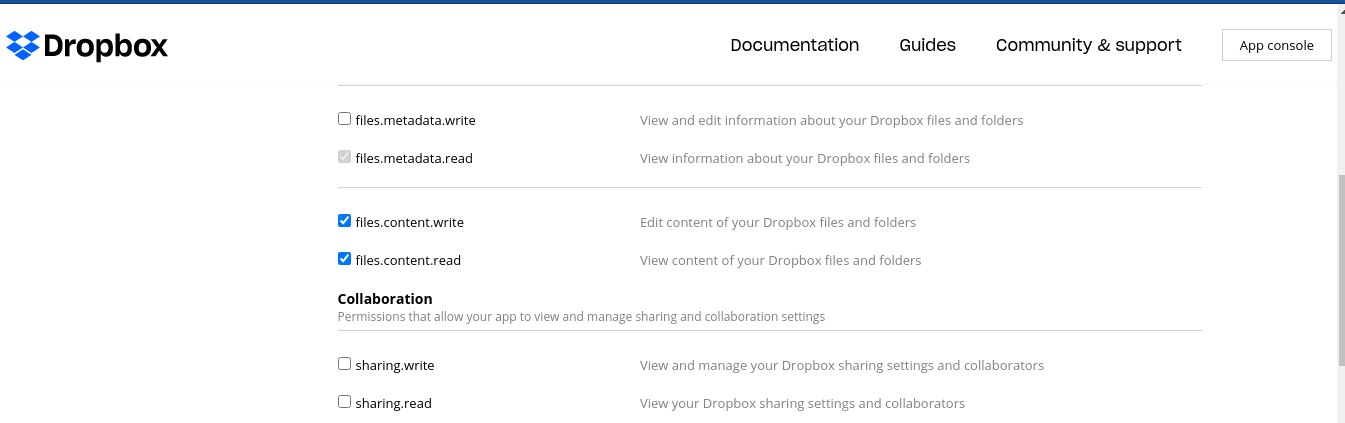
5. After creating app, move to the permissions tab, and check these...
6. Now it's time to get your OAUTH2 Access Token
You have to get your App Key and App Secret for this, from your dropbox app.
DROPBOX_CONSUMER_KEY=os.environ.get(DROPBOX_CONSUMER_KEY) ## App Key
DROPBOX_CONSUMER_SECRET=os.environ.get(DROPBOX_CONSUMER_SECRET) ## App Secret
7. Getting your Access Token...
$ docker-compose exec web python manage.py get_dropbox_token
You'll see a link, open it.
Copy the random characters from the browser and paste in your terminal.
8. And your Access Token is ready.
In your .env file
DROPBOX_ACCESS_TOKEN=<DROPBOX_ACCESS_TOKEN from the terminal>
Push it to Heroku, and django-dropbox-storage is set.
I hope this was simple enough. I'm open to suggestions :)
Happy coding...


